Building Autonomous AI Agents for Customer Support & Lead Generation: A Founder's Playbook (2026)
If you are still relying on basic, script-based chatbots for customer support or lead generation in 2026, you may be creating more friction than you are removing.
A traditional chatbot usually follows predefined paths. Ask the expected question, and it gives an expected answer. But customers don't always follow those paths.
A customer might ask about changing an order, checking a payment, requesting a refund, or modifying a subscription. A potential client might ask for pricing, explain a complicated requirement, and want to book a call immediately.
A basic chatbot often reaches its limit very quickly.
An AI agent works differently.
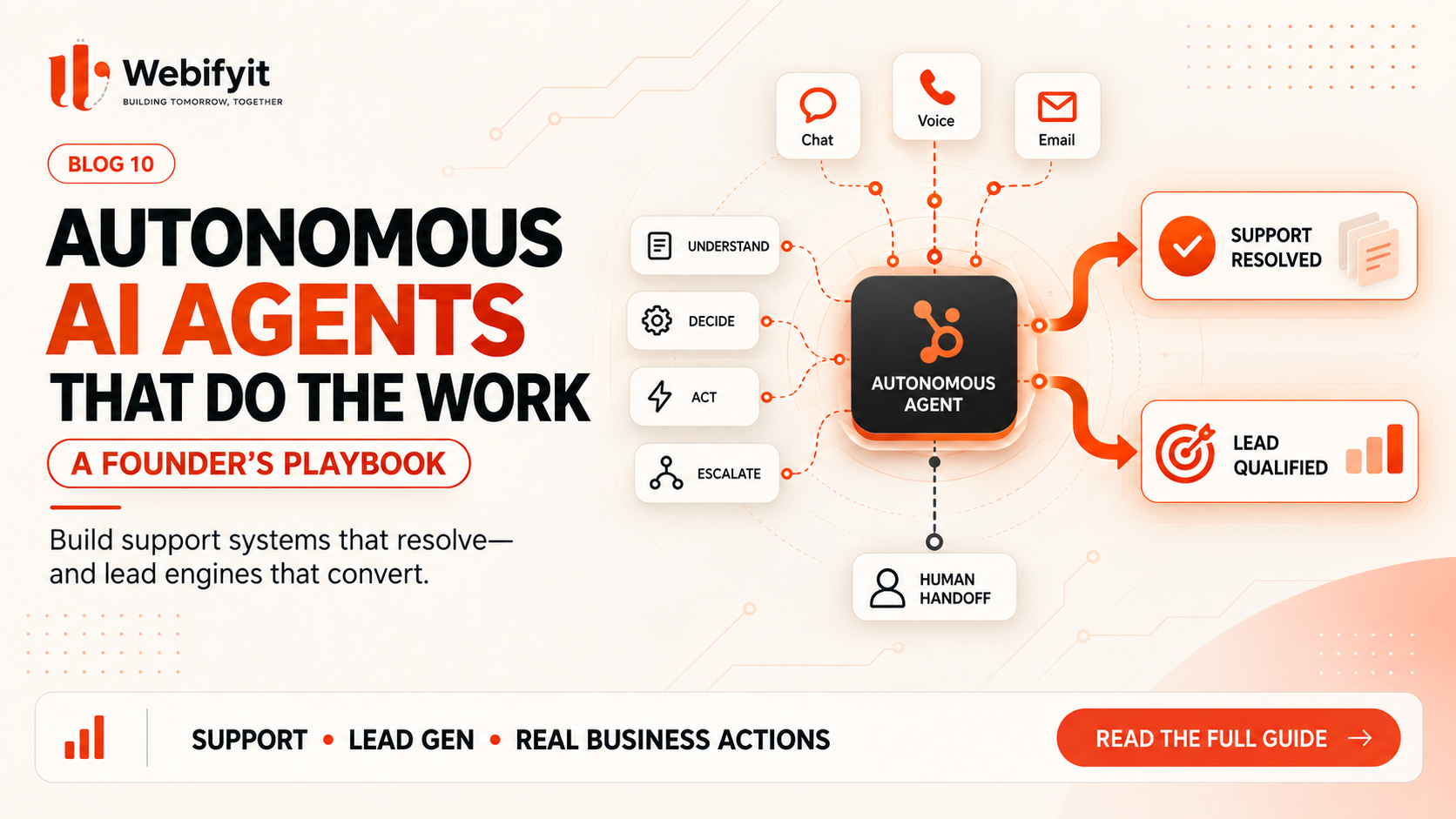
Instead of simply answering questions, an AI agent can understand a request, find the information it needs, use connected business systems, perform actions, and involve a human when necessary.
For businesses, that makes the conversation much more interesting.
The question is no longer just:
"Can AI answer my customers?"
It becomes:
"How much of the actual customer or sales workflow can AI handle?"
Chatbots and AI Agents Are Not the Same Thing
A chatbot is mainly a communication layer.
An AI agent is closer to an execution layer.
Imagine a customer asks:
"Where is my order?"
A basic chatbot might provide a generic tracking page.
An AI agent connected to your order system can find the customer's order, check its latest status, and provide the relevant information.
Now imagine a sales enquiry.
Instead of asking a visitor to fill out a long form, an AI agent can have a conversation, understand what the customer needs, ask relevant questions, collect the required details, and send the qualified lead to your sales team.
That difference is important.
The value of an AI agent doesn't come from sounding more intelligent.
It comes from being able to do something useful after understanding the request.
What Makes an AI Agent Actually Useful?
A production AI agent needs more than an AI model.
It needs access to the right information, the ability to use tools, clear business rules, and a safe way to handle situations it shouldn't solve by itself.
1. Access to Real Business Information
An agent needs accurate information about your company.
That might include product information, pricing, FAQs, customer records, order data, policies, internal documentation, or previous conversations.
This is why connecting the agent to your actual systems is so important.
2. The Ability to Take Actions
This is what separates an agent from a simple chat interface.
Depending on the business, an agent might:
- Check an order
- Create a lead
- Update a CRM
- Schedule a meeting
- Send a WhatsApp message
- Generate a payment link
- Create a support ticket
- Retrieve inventory information
The exact actions depend on what the business actually needs.
3. Business Rules
AI shouldn't be given unlimited authority.
For example, an agent may be allowed to answer questions and update a lead automatically.
But a large refund, account cancellation, or financial transaction might require approval from a human.
Good automation is not about giving AI unlimited control.
It is about giving it the right amount of control.
4. Human Escalation
There will always be situations where a human should take over.
A customer may be angry.
A request may fall outside company policy.
The information may be incomplete.
The agent may simply not have enough confidence to continue.
A good system should recognise this and transfer the conversation with the relevant context instead of forcing the AI to continue.
Where AI Agents Can Make the Biggest Difference
The best opportunities are usually not the flashy ones.
They're the repetitive workflows that employees deal with every day.
Customer Support
Customer support is one of the clearest examples.
Think about the questions your team answers repeatedly:
"Where is my order?"
"Can I change my delivery address?"
"What is your return policy?"
"Can I get an invoice?"
"When will this be delivered?"
An AI agent connected to the appropriate business systems can handle many of these conversations automatically.
This can reduce repetitive work while allowing human support staff to spend more time on complicated customer issues.
Lead Qualification
Speed matters in sales.
If someone visits your website and sends an enquiry, waiting hours for a response can create unnecessary friction.
An AI agent can engage immediately.
It can ask what the prospect is trying to achieve, understand the project requirements, collect basic qualification information, and pass the lead to the sales team.
For a software company, that might mean understanding the type of application the prospect wants, expected timeline, integrations, budget range, and business requirements before a sales call even happens.
The sales team receives a more useful lead instead of just a name and phone number.
Finance and Invoicing
Finance teams also deal with large amounts of repetitive work.
Invoices arrive.
Information needs to be extracted.
Records need to be checked.
Transactions need to be categorised.
Exceptions need to be flagged.
AI can assist with much of this process by extracting information from documents and connecting it with internal systems.
The important part is keeping financial controls in place.
AI should help the finance team move faster, not make sensitive decisions without appropriate oversight.
Inventory and Procurement
Inventory is another useful area.
A system can monitor stock levels, watch sales patterns, identify products approaching a threshold, and notify the appropriate person.
With the right integrations and controls, it can also prepare purchasing actions for approval.
The goal is not to make the system unnecessarily complicated.
The goal is to remove repetitive monitoring that employees shouldn't have to perform manually all day.
What Does the Customer Experience Look Like?
Let's take a simple example.
A visitor arrives on a company's website and starts a conversation.
Instead of seeing:
"Please fill out our contact form and we'll get back to you."
the visitor can explain what they need.
The AI agent understands the request and asks the next useful question.
Maybe the visitor says:
"We want a custom SaaS platform with payments, an admin dashboard and some AI features. We want to launch within two months."
The agent can then collect the missing information.
It might ask about the number of users, expected launch date, integrations, or existing systems.
Once enough information has been collected, it can create the lead, update the CRM, and offer available meeting times.
The customer doesn't need to repeat the same information to three different people.
The sales team doesn't have to manually enter everything.
That's where the real value comes from.
Don't Start by Building a Giant AI System
This is where many businesses go wrong.
They hear "AI agent" and immediately start thinking about a completely autonomous digital employee that can run the entire company.
That's usually the wrong place to start.
Start with one workflow.
Look for something that is:
- Repetitive
- Time-consuming
- Easy to measure
- Dependent on multiple systems
- Expensive to handle manually
For example:
Website enquiry → qualification → CRM update → meeting booking
That can be a much better starting point than trying to automate the entire sales department.
Once the workflow works reliably, expand it.
How to Measure Whether an AI Agent Is Actually Working
Don't judge your AI system by how impressive the demo looks.
Measure the business result.
For customer support, look at:
- Response time
- Resolution rate
- Escalation rate
- Customer satisfaction
- Support hours saved
For sales, look at:
- Lead response time
- Qualification rate
- Meeting bookings
- Conversion rate
- Sales-team time saved
For finance, look at:
- Processing time
- Error rate
- Manual hours
- Number of transactions processed
The best AI project is the one where you can clearly explain:
"Before automation, this took X. After automation, it takes Y."
What About the Cost?
The cost of building an AI agent depends heavily on the workflow.
A simple FAQ assistant is very different from an agent that needs access to your CRM, payment system, WhatsApp, internal database, calendar, and business rules.
There are usually several parts involved:
- AI model usage
- Hosting
- Database or knowledge storage
- Messaging costs
- API integrations
- Monitoring
- Development
- Ongoing maintenance
This is why there isn't one universal "AI agent price."
The better way to estimate the investment is to start with the workflow you want to automate and calculate how much that workflow currently costs the business.
If employees spend hundreds of hours every month performing repetitive tasks, even a relatively small automation can become valuable.
Security Should Come Before Autonomy
The more access an AI agent has, the more carefully it needs to be designed.
An agent that can only answer FAQs has limited risk.
An agent that can issue refunds, change customer records, send messages, or access sensitive financial information needs significantly stronger controls.
A production system should consider:
- Permissions
- Authentication
- Audit logs
- Data access boundaries
- Human approvals
- Validation rules
- Sensitive-data handling
- Failure and recovery procedures
The goal should not be:
"Let's give the AI access to everything."
It should be:
"Let's give the AI exactly the access it needs to perform its job."
Where Webifyit Fits In
At Webifyit, we don't see AI agents as another chatbot product.
We look at the business workflow first.
What is your team doing manually?
Where are customers waiting?
Which systems are disconnected?
Where are leads being lost?
Which repetitive tasks are consuming employee time?
Once we understand that, we can determine whether the right solution is an AI agent, a custom web application, an automation workflow, an integration, or a combination of them.
The technology comes after the problem.
That's important because not every business needs an AI agent.
Sometimes an existing SaaS tool is enough.
Sometimes a simple automation is enough.
And sometimes the business has reached the point where a custom system makes much more sense.
The Biggest Mistake Founders Make With AI Agents
The biggest mistake is focusing on the AI before understanding the workflow.
A business might spend weeks choosing models, frameworks, vector databases, and automation tools without clearly defining what the system is actually supposed to accomplish.
Start with the process.
Understand what happens today.
Find the bottleneck.
Measure the cost.
Then decide what should be automated.
AI becomes much more useful when it is connected to a clear business objective.
Should Your Business Build an AI Agent in 2026?
The answer depends on your workflow.
You probably don't need one just because AI agents are trending.
But you should seriously consider automation when your employees are:
- Answering the same questions every day
- Manually entering the same information into different systems
- Following repetitive sales qualification steps
- Processing large numbers of similar documents
- Monitoring information that changes continuously
- Spending significant time on administrative tasks
Those are the situations where AI agents can move from an interesting experiment to a real business tool.
Final Takeaway
AI agents are not valuable because they can have a conversation.
They're valuable because they can understand a task and help complete it.
That changes the role of software.
Instead of employees constantly opening different dashboards, copying information, updating records, checking systems, and sending repetitive messages, more of those steps can happen automatically.
But successful AI automation isn't about removing humans from the process.
It's about removing unnecessary work from humans.
Start with one workflow.
Connect the right data.
Give the system the right tools.
Set clear boundaries.
Keep humans involved where judgement matters.
Then measure the result.
That's a much more practical way to build AI into a real business.
Frequently Asked Questions
How is an AI agent different from a chatbot?
A chatbot primarily responds to conversations. An AI agent can also use tools, access business information, and perform actions as part of a workflow.
Can AI agents work with WhatsApp?
Yes. An AI agent can be connected to WhatsApp and other business systems when the appropriate integrations and permissions are available.
Do AI agents replace customer support teams?
They can reduce repetitive support work, but human employees are still important for complex issues, exceptions, sensitive situations, and relationship management.
Are AI agents expensive to build?
It depends on the workflow. A simple assistant can be relatively straightforward, while a system connected to CRM, payments, databases, WhatsApp, and other services requires significantly more engineering.
Should every business build a custom AI agent?
No. Sometimes an existing SaaS product or simple automation is the better solution. Custom AI systems make the most sense when there is a clear business problem that existing tools aren't solving efficiently.
Action Checklist for Founders
- Identify the most repetitive customer-support task.
- Identify where leads are being manually qualified or entered into your CRM.
- List the systems employees currently use for these workflows.
- Estimate how much employee time these processes consume.
- Identify one workflow that could be automated.
- Define what the AI should be allowed to do and what requires human approval.
- Measure the results after implementation.
Want to find out where AI automation could actually make a difference in your business?
Book a Free AI Strategy Session with Webifyit
Published by the Webifyit Engineering Team | Webifyit