SaaS Is Getting Expensive. Are AI Agents the Better Option for Indian SMBs in 2026?
For years, SaaS was presented as the obvious way for businesses to become more efficient.
Need a CRM? Subscribe to one.
Need customer support software? Subscribe to another.
Need inventory management? Add another subscription.
Need to connect them? Add Zapier, Make, or another integration tool.
Each product might be useful on its own. The problem starts when a growing business ends up with ten different tools that were never designed to work together.
Employees then spend their time moving information between them.
A customer sends a message on WhatsApp. Someone enters it into the CRM. Another person checks inventory. Someone else prepares a quotation. Finance creates an invoice. The sales team updates the CRM again.
The business is paying for software everywhere, but people are still doing the actual work manually.
That is where things are changing in 2026.
Instead of asking only, "Which SaaS tool should we buy?", businesses are increasingly asking:
"Can we build a system that actually does the work for us?"
This is where custom web applications and AI agents become interesting.
Not because every business should replace SaaS.
They shouldn't.
But when a company has expensive subscriptions, repetitive workflows, disconnected systems, and too much manual work, a custom system can sometimes make far more sense.
The Real Problem With SaaS Isn't SaaS
SaaS has solved a huge number of business problems.
The issue is usually fragmentation.
A growing business might have separate software for:
- Sales
- Customer support
- Accounting
- Inventory
- Communication
- Marketing
- Internal operations
The problem isn't necessarily any individual tool.
The problem is what happens between them.
When systems don't communicate properly, employees become the connection between them.
Someone exports a spreadsheet.
Someone copies customer details.
Someone updates the CRM.
Someone sends a WhatsApp message.
Someone checks another dashboard.
This works at a small scale.
As the business grows, it becomes expensive and error-prone.
The Per-User Cost
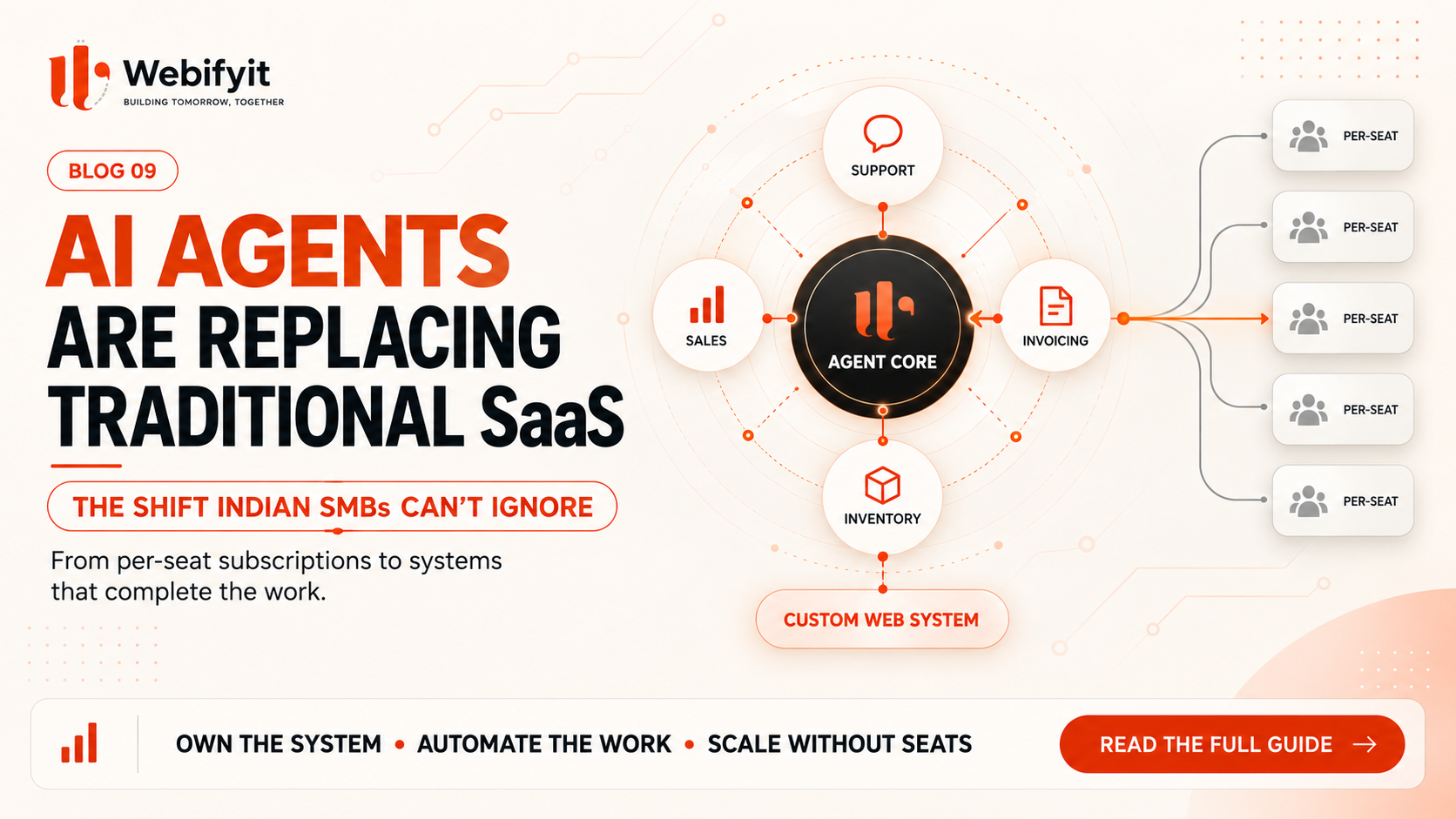
Many SaaS products charge based on users or seats.
That makes sense when a small team needs a few users.
But as a company grows from 10 employees to 50, 100, or more, the software bill can grow along with the headcount.
The bigger issue is that not every employee needs every feature.
You can end up paying for large platforms while most employees use only a small percentage of their capabilities.
Employees Become the Integration Layer
This is where businesses often underestimate the cost.
Suppose an employee spends an hour every day moving information between systems.
That may look like a small administrative task.
Across a month and across multiple employees, it becomes hundreds of hours.
And those hours don't create much new value.
They are simply keeping software systems in sync.
Businesses Start Adapting to Software
Generic SaaS platforms are designed for many different companies.
Your business is not generic.
You may have a specific approval process, a particular sales workflow, a unique way of handling customers, or a process that depends heavily on WhatsApp.
A standard SaaS platform can often support part of that workflow.
But sometimes the business ends up changing its process just to fit the software.
Custom software takes the opposite approach.
The software is designed around the business.
So What Is an AI Agent?
The easiest way to understand an AI agent is to stop thinking about it as a chatbot.
A chatbot primarily communicates.
An AI agent can communicate and take action.
Imagine a customer sends:
"Where is my order?"
A basic chatbot may give a generic support response.
An AI agent connected to your order system can check the customer's order, find its current status, and respond with the actual information.
Now imagine a new sales enquiry comes through your website.
An AI agent could respond to the customer, collect the important details, qualify the enquiry, update the CRM, and schedule a meeting.
The important part is that the agent is not just generating words.
It is connected to your business systems and can perform tasks.
What Does a Useful AI Agent Need?
A production AI agent needs more than a powerful language model.
It needs access to relevant business information.
It needs tools that allow it to perform actions.
It needs business rules that define what it is allowed to do.
And it needs a way to hand work back to a human when the situation becomes complicated.
For example, a support agent might be allowed to answer questions and check order status automatically.
But if a customer requests a large refund, the system might require manager approval.
That is how AI becomes part of a business process rather than just another chat window.
Four Areas Where AI Agents Can Remove Manual Work
1. Customer Support
Customer support teams often answer the same types of questions repeatedly.
Where is my order?
How do I return this?
When will my delivery arrive?
Can I change my address?
An AI agent connected to the company's actual systems can handle many of these requests automatically.
It can retrieve information, answer questions, collect requests, and escalate unusual cases to employees.
The important difference is that it is working with real business information rather than giving generic answers.
2. Sales Qualification
Speed matters in sales.
A lead that receives a response immediately is different from one that waits until the next working day.
An AI sales agent can respond to website enquiries or messages, ask qualifying questions, understand the requirement, collect the information, and update the CRM automatically.
The sales team can then focus on qualified opportunities instead of manually entering every lead.
3. Finance and Invoicing
Finance teams spend a surprising amount of time moving information between invoices, spreadsheets, accounting systems, and internal records.
AI can help extract information from documents, classify transactions, identify inconsistencies, and route exceptions to the correct person.
The goal isn't to give an AI unrestricted control over finance.
The goal is to remove repetitive administrative work around financial decisions.
4. Inventory and Procurement
Inventory is another area where automation can make a real operational difference.
A system can monitor stock levels, identify unusual changes in demand, and notify the appropriate person when inventory reaches a threshold.
With the right integrations and controls, it can also prepare purchase orders or supplier messages for approval.
Again, the key is not the AI itself.
The value comes from connecting the AI to the actual workflow.
Does Custom Software Actually Cost Less?
Sometimes.
But this needs to be looked at properly.
A SaaS subscription and a custom system aren't the same type of expense.
A SaaS product is normally an ongoing operating expense.
Custom software is an investment in a system built around your business.
The business case becomes more interesting when you already have:
- Multiple SaaS subscriptions
- Large user counts
- Expensive integrations
- Repetitive manual workflows
- Complex processes
- High administrative overhead
For example, imagine a company paying for CRM software, customer support software, inventory tools, automation platforms, communication tools, and additional integrations.
The monthly bill is only one part of the cost.
There is also the employee time spent operating all of those systems.
That is the number businesses often forget to calculate.
The Better ROI Question
Instead of asking:
"How much will custom software cost?"
ask:
"How much does this process cost us every month?"
Suppose ten employees each spend one hour per working day copying information between different systems.
That's roughly 200 hours every month.
Now calculate the real cost of those hours.
Then add:
- Software subscriptions
- Integration costs
- Mistakes
- Delays
- Missed follow-ups
- Repetitive administrative work
The real cost of the current process can be much larger than the software bill alone.
That is where automation starts becoming a business decision rather than a technology experiment.
You Don't Need to Replace Everything
This is probably the most important part.
You don't need to replace your entire software stack.
In fact, you probably shouldn't.
Start with one workflow.
Maybe your sales team takes too long to respond to new enquiries.
Maybe support employees answer the same questions every day.
Maybe your finance team spends hours processing invoices.
Maybe stock updates are inconsistent.
Pick one expensive, repetitive process.
Automate it.
Measure what happened.
Then decide whether to expand.
This makes the transition much safer.
A Practical Way to Move From SaaS to AI Automation
Step 1: List Your Software Costs
Write down every software subscription your business is paying for.
Don't just look at the monthly price.
Look at:
- Number of users
- Actual usage
- Unused features
- Integration costs
- Manual work around the software
You may discover that the problem isn't one expensive product.
It is the entire collection.
Step 2: Find Your Biggest Manual Bottleneck
Look for a process where employees repeatedly copy, verify, update, or communicate information.
That is often the easiest place to start.
Step 3: Build a Focused MVP
Don't start by rebuilding your entire company in software.
Build one useful workflow.
For example:
New lead → AI qualification → CRM update → Meeting booking
That's enough for a first version.
Step 4: Measure the Result
Track actual numbers.
For example:
- Response time
- Hours saved
- Number of errors
- Conversion rate
- Processing time
- Cost per transaction
Now you have something much better than an AI demo.
You have a measurable business result.
Where Webifyit Fits In
At Webifyit, we don't believe every business needs custom software.
Sometimes an existing SaaS product is the right solution.
But there are businesses where the software stack has become more complicated than the process it was supposed to simplify.
That is where custom systems become valuable.
We build custom web applications, AI agents, business automation, integrations, dashboards, and internal systems around the actual workflow of a company.
The idea is simple:
Don't force the business to work like the software. Build the software around how the business actually works.
That can mean automating a sales process, connecting a CRM to WhatsApp, creating a custom operational dashboard, building an AI support agent, or connecting several existing systems into one workflow.
The Biggest AI Automation Mistake
The biggest mistake isn't choosing the wrong AI model.
It isn't choosing the wrong framework.
It is automating a process that hasn't been properly understood.
AI cannot fix a bad process just because it is intelligent.
Before automating anything, understand:
Who starts the process?
What information is required?
What happens next?
What decisions need to be made?
Which systems are involved?
Where do exceptions happen?
When does a human need to step in?
Once those questions are clear, the technology becomes much easier to design.
Should Your Business Replace SaaS With AI Agents?
Probably not completely.
The better question is:
Which parts of your current software stack are creating more work than value?
If your SaaS tools are affordable, useful, and well integrated, keep them.
But if your employees are constantly moving information between platforms, paying for unused seats, maintaining complicated integrations, or following workflows that don't fit the business, it's worth exploring another approach.
That could be:
- Better automation
- A custom web application
- An AI agent
- An integration layer
- Or a combination of all four
The important thing is to start with the business problem.
Not the technology.
Final Takeaway
SaaS isn't disappearing.
But the way businesses use software is changing.
For years, the model was simple:
Buy software → give it to employees → employees operate the software.
The emerging model is different:
Connect business data → give software the ability to act → let AI handle more of the workflow.
That does not mean humans disappear.
It means humans spend less time doing work that software should have been doing in the first place.
For Indian SMBs and startups, that can create a meaningful advantage.
The opportunity isn't to cancel every SaaS subscription.
It is to identify where your business is still paying people to move data, copy information, check systems, send repetitive messages, and perform routine tasks that could be automated.
That's where AI agents become genuinely useful.
Frequently Asked Questions
Can AI agents completely replace employees?
No. AI agents are best used for repetitive and structured work. Human employees remain important for judgement, relationships, negotiation, strategy, and complicated situations.
Is custom software always cheaper than SaaS?
No. Custom software has development and maintenance costs. It becomes more attractive when recurring SaaS costs, manual work, integration complexity, and operational overhead become significant.
Should a small business build an AI agent?
Not automatically. First identify a repetitive workflow with a measurable cost. If automating that process can create a clear return, then a focused AI solution may make sense.
Can AI agents work with existing SaaS?
Yes. A custom system doesn't necessarily mean replacing everything. Existing CRM, accounting, communication, and business systems can often remain in place while automation connects them.
What happens when an AI agent can't handle something?
A properly designed system should have rules, permissions, validation, and human escalation. The agent should know when to stop and involve a person.
Action Checklist
- List every SaaS subscription your business currently pays for.
- Check how many users actually use each system.
- Identify where employees repeatedly copy or re-enter information.
- Estimate how many hours those workflows consume every month.
- Identify one process that could be automated first.
- Measure its current cost and performance.
- Compare automation, existing SaaS, and custom software before deciding.
Want to find out which part of your business should be automated first?
Book a strategy session with Webifyit
Published by the Webifyit Engineering Team | Webifyit