Your team has ChatGPT.
You probably have a few other AI tools too.
Maybe you've tested a chatbot.
Maybe someone is experimenting with an AI agent.
And yet...
Someone is still copying leads from email into Excel.
Someone is still checking WhatsApp and then updating the CRM manually.
Someone is still preparing the same report every Monday.
Someone is still calling customers one by one.
Someone is still reminding the sales team to follow up.
That sounds strange.
But it is becoming very common.
Businesses are buying AI faster than they are actually redesigning the way work gets done.
And that's where the real opportunity is.
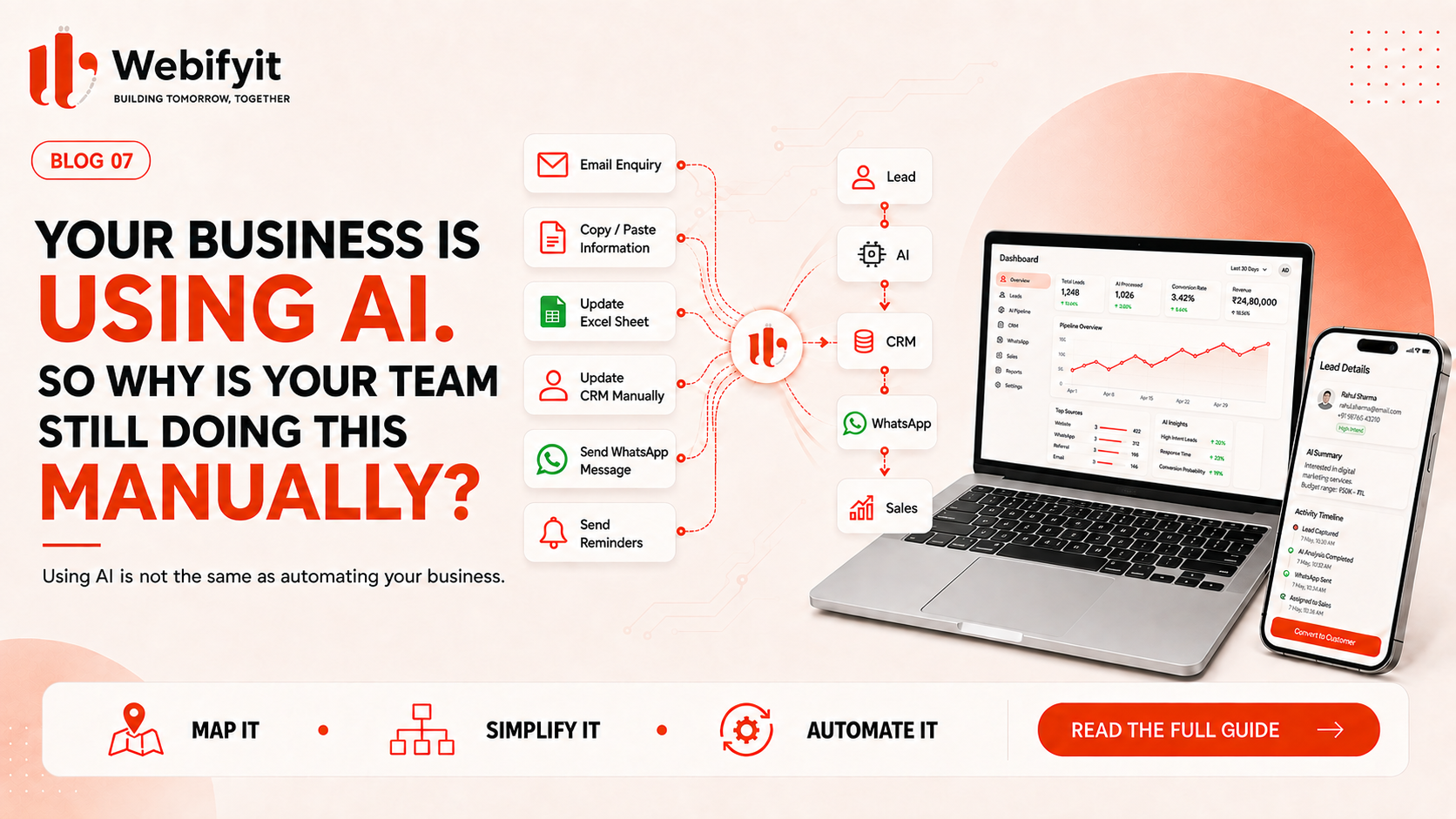
Using AI is not the same as automating your business.
The difference is much bigger than it sounds.
The AI is not the problem
A lot of companies already have access to very capable AI.
The problem is that the AI often sits next to the business, instead of being part of it.
For example:
Employee
→ opens ChatGPT
→ copies customer enquiry
→ pastes it into ChatGPT
→ reads the response
→ opens CRM
→ copies the details
→ sends a WhatsApp message
→ creates a reminder
The company can proudly say:
"We're using AI."
Technically, yes.
But the workflow is still mostly manual.
The AI saved one small step.
It didn't change the process.
Real automation looks different
Now imagine the same workflow:
Customer enquiry
↓
AI understands the request
↓
AI qualifies the lead
↓
CRM updated automatically
↓
Relevant WhatsApp message sent
↓
Salesperson receives the qualified lead
Now the employee isn't doing five repetitive steps.
They are handling the part where their judgement actually matters.
That's the difference between:
AI as a tool
and
AI as part of a business system.
The biggest AI mistake businesses are making
They're starting with:
"Which AI tool should we buy?"
I think the better question is:
"Where are we losing time, money or opportunities?"
Because once you find the bottleneck, the technology becomes much easier to choose.
Maybe the answer is:
AI.
Maybe it's:
normal automation.
Maybe it's:
an API integration.
Maybe it's:
custom software.
And sometimes the answer is:
nothing.
Not every problem needs AI.
Where manual work usually survives
Let's take a normal growing business.
It might already have:
CRM
Accounting software
Excel
Website
ERP
Project management
Customer support software
All of these tools may be doing their jobs.
The problem is what happens between them.
For example:
Website
→ lead arrives
→ salesperson reads email
→ copies information to Excel
→ enters CRM
→ sends WhatsApp message
→ sets reminder
→ follows up later
The software exists.
The AI exists.
The people exist.
But the workflow is still broken.
This is where integration becomes valuable
Instead of replacing the entire stack, you may simply need to connect it.
For example:
Website
↓
AI
↓
CRM
↓
↓
Sales team
Or:
Order
↓
ERP
↓
Inventory
↓
Notification
↓
Customer
The business doesn't necessarily need another application.
It may need the systems it already owns to work together.
1. Sales is one of the easiest places to start
Sales teams perform a huge amount of repetitive work.
Think about:
lead capture
qualification
data entry
follow-up
meeting scheduling
proposal preparation
CRM updates
lead reminders
customer reactivation
You don't need to automate everything.
Start with one step.
For example:
Lead qualification
Instead of a salesperson manually sorting every enquiry:
Website / WhatsApp / Email
↓
AI reads the enquiry
↓
Collects missing information
↓
Scores the lead
↓
Updates CRM
↓
Alerts salesperson
Now your sales team spends less time processing leads and more time selling.
2. Customer support
Look at your last 100 support conversations.
You'll probably find repetition.
Questions about:
orders
pricing
booking
delivery
passwords
documents
product information
policies
A good AI system can handle the repetitive part.
But it shouldn't necessarily handle everything.
A better model is:
Simple question
→ AI
Unclear question
→ AI asks for more information
Complex or sensitive issue
→ human
That gives you automation without pretending humans are unnecessary.
3. WhatsApp
This deserves special attention because so many businesses already operate through WhatsApp.
Imagine a customer sends:
"Can you send me the catalogue?"
Today someone might:
open WhatsApp
find the message
find the catalogue
send it
record the lead
follow up
With a connected workflow:
Customer message
↓
AI understands intent
↓
Catalogue sent
↓
Lead created
↓
Salesperson notified
↓
Follow-up scheduled
Now WhatsApp has become part of the business system.
Not just another inbox.
4. Finance and document processing
Think about invoices.
Someone receives:
↓
opens it
↓
reads it
↓
copies information
↓
enters it
↓
checks it
↓
sends it for approval
There are parts of this process that AI can assist with.
For example:
Invoice
↓
AI extracts information
↓
Validation
↓
Business rules
↓
Accounting system
↓
Human approval
Again, the interesting part isn't:
"AI can read PDFs."
The interesting part is:
"We removed repetitive data entry from the finance workflow."
5. Recruitment
Recruiters often spend significant time on repetitive early-stage tasks.
For example:
candidate screening
basic questions
scheduling
follow-ups
CRM updates
document collection
A workflow can potentially handle some of these steps:
Application
↓
AI extracts candidate information
↓
Screening questions
↓
Candidate score / structured summary
↓
Recruiter review
↓
Interview scheduling
The recruiter still makes the important decision.
AI handles the repetitive work around it.
6. Manufacturing
This is where things get particularly interesting.
A manufacturer might receive enquiries through:
phone
website
The sales team may need to collect:
product
quantity
specification
delivery location
required date
Then someone enters it into another system.
A connected workflow could become:
Enquiry
↓
AI captures requirement
↓
CRM
↓
Inventory / ERP lookup
↓
Salesperson
↓
Quotation
Instead of building a giant new ERP, you may only need to connect the workflows that are currently costing the business time.
7. Operations and reporting
Here's another common one.
Every Monday:
someone opens Excel
downloads data
cleans it
copies information
builds charts
writes a summary
sends an email
This is exactly the type of routine workflow businesses should examine.
A better process could be:
Data sources
↓
Automated collection
↓
Processing
↓
Dashboard
↓
AI-generated summary
↓
Manager
The manager still decides what to do.
But they no longer spend the morning preparing the report.
The part many people miss: AI needs access to your business
A language model can be incredibly capable.
But it doesn't automatically know:
your customers
your inventory
your orders
your CRM
your internal rules
your calendar
your product catalogue
your operational data
That's why useful business AI often requires connections to the systems where the information already lives.
This can mean:
APIs
databases
webhooks
CRM integrations
ERP integrations
knowledge bases
internal software
The AI is one layer.
The business systems are another.
The workflow connecting them is where the value appears.
This is why "AI chatbot" is sometimes the wrong project
Suppose your real problem is:
"Salespeople aren't following up with warm leads."
A chatbot on the website may get more conversations.
But if the lead still isn't:
captured
qualified
assigned
followed up
tracked
you haven't fixed the actual problem.
Maybe what you really need is:
Lead capture
AI qualification
CRM
automatic follow-up
sales notification
The chatbot might be one small part.
The same is true for AI agents
An AI agent can be useful.
But don't build an agent simply because agents are popular.
Ask:
Does the task require multiple steps?
Does the AI need access to other systems?
Does it need to make a decision?
Does it need to take an action?
Can we measure the result?
If the answer is no to most of these, a simpler automation may be enough.
That's often better.
The simplest workflow can have the biggest ROI
You don't need an impressive demo.
You need a useful outcome.
For example:
"Every website lead is automatically entered into the CRM within one minute."
That's useful.
Or:
"Customers can book appointments without waiting for a staff member."
Useful.
Or:
"Missed calls receive an automated follow-up."
Useful.
Or:
"Invoices are extracted automatically and sent for approval."
Useful.
The system doesn't have to look futuristic.
It has to work.
How to find what your business should automate
Try this exercise.
Take one normal week.
Write down every repetitive task your team performs.
Don't judge them yet.
Just list them.
Then ask:
How often does it happen?
Daily?
Weekly?
Thousands of times?
How long does each task take?
Ten minutes?
One hour?
What happens when someone forgets?
Lost lead?
Late order?
Customer complaint?
Does it affect revenue?
Does it affect customer experience?
Does it require human judgement?
This will usually reveal several good candidates.
Score your workflows
You can make a simple score.
Give each workflow a score from 1–5 for:
Frequency
Time consumed
Business impact
Repetition
Ease of automation
Then look for the tasks with the highest combined score.
Those are your first automation candidates.
You don't need an expensive consultant to discover obvious repetitive work.
You need to actually map the process.
Don't automate a broken process
This is important.
Suppose:
Lead comes in
→ salesperson calls
→ salesperson writes notes
→ manager approves
→ another employee enters CRM
→ salesperson follows up
If the process itself is unnecessarily complicated, don't simply automate every step.
First:
simplify
then:
automate
This can save more money.
Start with one workflow
I wouldn't recommend a business start with:
"Let's transform everything with AI."
Start with:
One problem.
One workflow.
One measurable result.
For example:
Missed-call recovery
Measure:
calls received
missed calls
callbacks
qualified leads
sales
Then decide whether to expand.
This is much safer than building a giant system before you know whether it works.
What should you measure?
Don't stop at:
"We deployed AI."
Track:
time saved
response time
leads recovered
conversion rate
tickets resolved
human interventions
cost per interaction
error rate
revenue influenced
These numbers tell you whether automation is actually helping.
AI adoption is not the same as AI transformation
This is an important distinction.
A business can have:
ChatGPT
Copilot
AI meeting notes
AI writing tools
AI image generation
and still operate almost exactly as it did before.
That's AI adoption.
AI transformation happens when the workflow itself changes.
For example:
Before:
Lead → human data entry → manual qualification → manual follow-up
After:
Lead → AI qualification → CRM → automated follow-up → human sales
That's a real operational change.
The future isn't about having the most AI tools
I think we're moving toward something simpler.
Businesses won't win because they have:
17 AI subscriptions.
They'll win because they have:
a few AI systems connected to the right workflows.
That means:
fewer manual steps
better data flow
faster response
better customer experience
more useful employee time
and clearer business outcomes.
What Webifyit looks for
When we work with a business, we don't start by asking:
"Which AI tool do you want?"
We ask:
"Show us what happens from the moment a customer contacts you to the moment the job is complete."
Then we look for:
repetitive work
manual data entry
missed follow-ups
disconnected systems
slow approvals
information trapped in spreadsheets
calls that nobody answers
reports that take hours to prepare
Those are usually where the interesting opportunities are.
And then we decide whether the answer is:
AI
automation
API integration
custom software
or a combination.
Final takeaway
Your business doesn't need to use AI everywhere.
It needs to use AI where it changes the economics of the workflow.
Start with the work that:
happens often
takes time
follows a pattern
costs money
or
creates missed opportunities
Then:
Map it.
Simplify it.
Automate it.
Measure it.
Improve it.
And only then move to the next workflow.
Because the goal isn't to say:
"We're an AI-powered company."
The goal is to be able to say:
"This process used to take our team four hours. Now it takes twenty minutes."
That's when AI becomes useful.
Want to find the best process to automate?
Webifyit helps businesses map their workflows, identify practical AI and automation opportunities, connect existing systems, and build the software needed to make the process actually work.
Request a free workflow assessment →